
学创消息推送服务接入说明文档
1、接入说明
强烈建议使用Netty接入学创消息服务,因为它具有如下优点:
1、Netty大大简化了网络程序的开发过程;
2、技术稳定可靠,采用异步非阻塞编程模型;
3、功能强大,预置了多种编解码功能,支持多种主流协议;解决了粘包/拆包的问题;
4、经历了大规模的商业应用考验,质量得到验证;
5、多语言、跨平台;
正因为这些优点,Netty逐渐成为 Java NIO 编程的首选框架。
2、Netty客户端接入流程
2.1流程时序图
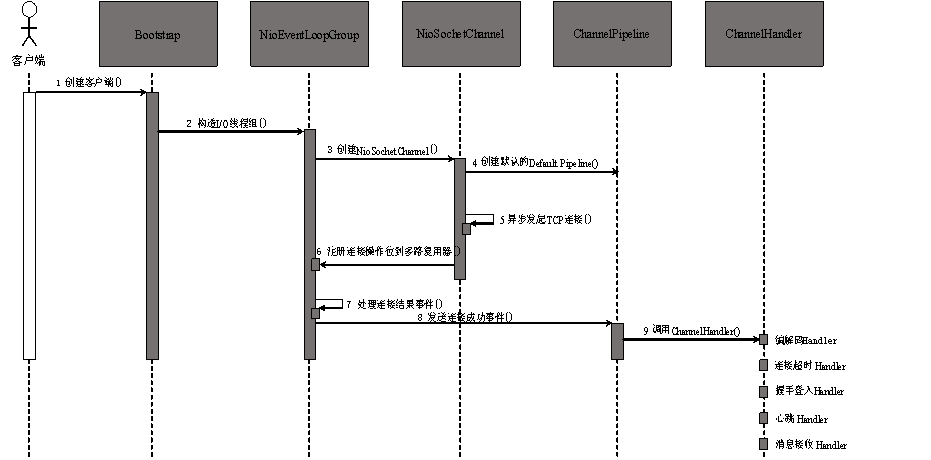
2.2流程分析
- 用户线程创建 Bootstrap 实例 ,通过 API 设置创建客户端相关的参数,异步发起客户端连接。
- 创建处理客户端连接 、I/0 读写的 Reactor 线程组 NioEventLoopGroup。
- 通过Bootstrap的ChannelFactory 和用户指定的Channel 类型创建用于客户端连接的 NioSocketChannel;
- 创建默认的Channel Handler pipeline,用于调度和执行网络事件;
- 异步发起 TCP 连接, 判断连接是否成功。如果成功, 则直接将 NioSocketCbannel 注册到多路复用器上,监听读操作位,用于数据报读取和消息发送;如果没有立即连接成功,则注册连接监听位到多路复用器,等待连接结果;
- 注册对应的网络监听状态位到多路复用器;
- 由多路复用器在I/0现场中轮询各Channel, 处理连接结果;
- 如果连接成功,设置Future结果,发送连接成功事件,触发ChannelPipeline执行;
- 由Channel Pipeline调度执行系统和用户的Channel Handler, 执行业务逻辑。
3、客户端Demo
源码包:

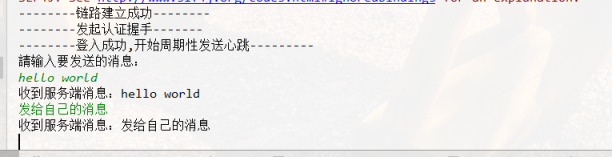
找到com.enableets.edu.message.client.NettyClientRunner.java文件,运行main方法,控制台日志如下:

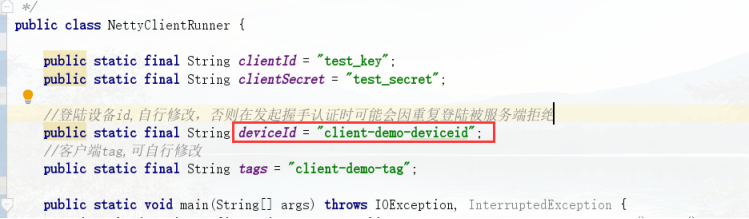
若出现服务端拒绝登入的情况,可能是由于重复登入造成,请修改deviceId后重试:
在控制台输入要发送给服务端的消息并回车,客户端将收到服务端返回的消息。Demo中消息的接收方是自身,开发者可自行修改消息的接收方;
4、客户端Demo源码解析
源码请参照附件中的“客户端源码”
4.1创建客户端连接
服务端的地址通过接口 http:// r30.enable-ets.com/microservice/configservice/v1/configuration 获取,请求将返回可用的服务端配置的集合。
由于服务端可能会存在服务挂掉等不可用的情况,开发者在选择服务进行连接时请使用随机抽选的方式;同样,当所选服务不可用或连接断开需要重连时,从服务列表中重新随机选择一项进行重连;
- private CloudServiceConfigurationDTO getMessageServer(){
- if (messageServerList.size() <= 1){
- return messageServerList.get(0);
- }else{
- Random random = new Random();
- return messageServerList.get(random.nextInt(messageServerList.size()));
- }
- }
- try {
- Bootstrap b = new Bootstrap();
- ((Bootstrap)b.group(group)).channel(NioSocketChannel.class)
- .option(ChannelOption.TCP_NODELAY, true)
- .handler(new ChannelInitializer<SocketChannel>() {
- @Override
- public void initChannel(SocketChannel ch)
- throws Exception {
- // 加入消息处理handler
- ch.pipeline().addLast("Handler",new Handler());
- });
- // 发起异步连接操作
- ChannelFuture future = b.connect(host, port).sync();
- future.channel().closeFuture().sync();
- } finally {
- // 所有资源释放完成之后,清空资源,再次发起重连操作
- }
注意连接发生错误时,可在finally代码块中待资源释放完成后发起重连操作;
4.2编解码实现
数据对象编解码的处理采用MessagePack进行编解码,这是由其高效的性能,以及良好的多语言支持决定的,目前支持c/c++、java、ruby、python、php等开发语言。
自定义解码处理器可继承MessageToByteEncoder类,覆写其encode()方法:
- @Override
- protected void encode(ChannelHandlerContext ctx, NettyMessage msg, ByteBuf out) throws Exception {
- try{
- byte[] row;
- if (msg.getBody() == null){
- row = new byte[0];
- }else{
- row = msgpack.write(msg.getBody());
- }
- out.writeInt(msg.getHeader().getCrcCode());
- out.writeInt(row.length);
- out.writeLong((msg.getHeader().getSessionID()));
- out.writeByte((msg.getHeader().getType()));
- out.writeByte((msg.getHeader().getPriority()));
- out.writeInt((msg.getHeader().getAttachment().size()));
- String key = null;
- byte[] keyArray = null;
- String value = null;
- byte[] valueArray = null;
- for (Map.Entry<String, String> param : msg.getHeader().getAttachment().entrySet()) {
- key = param.getKey();
- keyArray = msgpack.write(key);
- out.writeInt(keyArray.length);
- out.writeBytes(keyArray);
- value = param.getValue();
- valueArray = msgpack.write(value);
- out.writeInt(valueArray.length);
- out.writeBytes(valueArray);
- }
- if (msg.getBody()!=null) {
- out.writeBytes(row);
- }
- } catch (Exception e){
- throw e;
- }
- }
自定义解码处理器可继承ByteToMessageDecoder类,覆写decode()方法:
- @Override
- protected void decode(ChannelHandlerContext ctx, ByteBuf in, List<Object> out) throws Exception {
- try {
- if (in == null || in instanceof EmptyByteBuf || in.readableBytes() < 0) {
- return ;
- }
- MessagePack msgpack = new MessagePack();
- NettyMessage nettyMessage = new NettyMessage();
- Header header = new Header();
- int crcCode = in.readInt();
- int length = in.readInt();
- long sessionId = in.readLong();
- byte type = in.readByte();
- byte priority = in.readByte();
- header.setCrcCode(crcCode);
- header.setLength(length);
- header.setSessionID(sessionId);
- header.setType(type);
- header.setPriority(priority);
- nettyMessage.setHeader(header);
- int size = in.readInt();
- if (size > 0) {
- Map<String, String> attch = new HashMap<String, String>(size);
- int keySize = 0;
- byte[] keyArray = null;
- String key = null;
- int valueSize = 0;
- byte[] valueArray = null;
- String value = null;
- for (int i = 0; i < size; i++) {
- keySize = in.readInt();
- keyArray = new byte[keySize];
- in.readBytes(keyArray);
- key = msgpack.read(keyArray,String.class);
- valueSize = in.readInt();
- valueArray = new byte[valueSize];
- in.readBytes(valueArray);
- value =msgpack.read(valueArray,String.class);
- attch.put(key, value);
- }
- keyArray = null;
- key = null;
- valueArray = null;
- value = null;
- header.setAttachment(attch);
- }
- if (in.readableBytes() < length) {
- in.resetReaderIndex();
- return;
- }
- in.markReaderIndex();
- final ByteBuf frame;
- final int lg = in.readableBytes();
- if (lg != 0) {
- frame = in.readBytes(lg);
- if(type == 0){
- nettyMessage.setBody(msgpack.read(frame.array(), ClientToServerMsgBody.class));
- }else if (type == 1){
- nettyMessage.setBody(msgpack.read(frame.array(), ServerToClientMsgBody.class));
- }else{
- nettyMessage.setBody(frame.array()[0]);
- }
- }
- out.add(nettyMessage);
- }catch (Exception e){
- logger.error(e.getMessage(),e);
- throw e;
- }
- }
4.3登陆握手
当连接通道成功激活时进行登陆操作,LoginBody包含以下数据项:
- @Message
- public class LoginBody {
- @Index(0)
- private String clientId;
- @Index(1)
- private String secret;
- @Index(2)
- private String deviceId;
- @Index(3)
- private String tags;
- }
clientId 及 secret联系管理员进行申请,deviceId为登陆设备标识,必须确保唯一,同一clientId下的同一个deviceId只能同时一个在线,当deviceId已经在线,其它的握手将被拒绝;
tags表示当前连接的身份标识,有多个时请用英文逗号隔开;
向服务端发送握手消息时,将header中的type参数设为3;
服务端接到客户端的握手登入请求后会将处理结果返回给客户端,客户端接到服务端type为4的消息类型是进行握手是否成功做出判断,握手登入成功时服务端返回1(byte类型),失败时返回0(byte类型):
- public void doService(NettyMessage message) {
- byte loginResult = (byte) message.getBody();
- if (loginResult != (byte) 0) {
- // 握手失败,关闭连接
- Logger.error("登陆失败");
- getContext().close();
- System.exit(-1);
- } else {
- Logger.error("Login is ok : " + message);
- getContext().fireChannelRead(message);
- }
- }
4.4心跳发送与接收处理
握手成功后客户端开始以5s/次的固定频率向服务端发送心跳,服务端收到心跳请求后返回心跳响应消息
- public void doService(NettyMessage message) {
- if (message.getHeader().getType() == 4) {
- heartBeat = getContext().executor().scheduleAtFixedRate(
- new HeartBeatReqHandler.HeartBeatTask(getContext()), 0, 5000,
- TimeUnit.MILLISECONDS);
- } else if (message.getHeader().getType() == 6) {
- LOG.debug("Client receive server heart beat message : ---> " + message);
- }
- }
4.5 接收消息
服务端向客户端推送的消息数据结构如下:
- @Message
- public class ServerToClientMsgBody {
- /** 消息来源标识 */
- @Index(0)
- private String sourceId;
- /** 消息来源名称 */
- @Index(1)
- private String sourceName;
- /** 消息内容 */
- @Index(2)
- private String content;
- /** 消息推送时间 */
- @Index(3)
- private Date pushTime;
- }
客户端接收到服务端的推送消息后,可自行按照业务逻辑进行处理;建议收到消息后进行异步处理,否则如果消息通道阻塞时间过长后容易被服务端当作无效连接清除掉。
4.6发送消息
首先当通道连接成功时通过channelActive(ChannelHandlerContext ctx)函数将ChannelHandlerContext对象保存到线程副本对象中:
- /** 当前线程context */
- ThreadLocal<ChannelHandlerContext> threadContext;
- @Override
- public void channelActive(ChannelHandlerContext ctx) throws Exception {
- threadContext = ThreadLocal.withInitial(() -> ctx);
- }
当客户端与服务端握手认证成就功后就可以通过该channel对象向服务端发送消息了:
- public void sendMessage(NettyMessage message) {
- if (message == null) {
- return;
- }
- threadContext.get().writeAndFlush(message);
- }
发送消息参数结构:
- @Message
- public class ClientToServerMsgBody {
- /** 发送对象 */
- @Index(0)
- private Audience audience;
- /** 消息信息 */
- @Index(1)
- private String message;
- /** 额外信息 */
- @Index(2)
- private Options options;
- @Message
- public static class Audience implements Serializable {
- @Index(0)
- private Set<String> tags;
- @Index(1)
- private Set<String> tagAnd;
- @Index(2)
- private Set<String> tagNot;
- }
- @Message
- public static class Options implements Serializable {
- @Index(0)
- private Integer timeToLive;
- }
- }
4.7连接超时处理
当因为网络原因或其它程序错误连接通道长时间(50s即10个心跳周期)未进行通信时,服务端将会断开连接进行资源回收;同理当客户端长时间无法与服务端进行有效通信时,应该主动断开连接并尝试重连。
客户端超时机制的实现可以通过netty内置的ReadTimeoutHandler()实现,创建客户端时将readTimeoutHandler添加进pipeline的处理链即可。
5、消息参数详解
5.1 服务端消息参数
参数名称 | 类型 | 说明 |
sourceId | String | 消息发送端标识 |
sourceName | String | 消息发送端名称 |
content | String | 消息内容字符串,具体格式规范由发送方定义 |
pushTime | Date | 消息推送的时间 |
客户端接收到的消息与自身握手认证时传入的tags有关,当客户端tags与服务端消息目标tags匹配时将会收到该消息的推送,具体匹配规则参照4.2。通常客户端接收到消息后只需要关注content参数,解析该参数进行具体业务操作。
5.2 客户端消息参数
参数名称 | 类型 | 说明 |
audience | object | 推送目标,包括三组字符串数组 tags: 多个标签之间是 OR 的关系,即取并集。 tagAnd: 多个标签之间是 AND 关系,即取交集。 tagNot: 多个标签之间,先取多标签的并集,再对该结果取补集。 |
message | String | 消息内容,将被推送到目标客户端 |
options | Object | 可选参数: timeToLive: 单位s,当目标离线时消息保存时间,默认为7天 |
注意,以上三种目标类型至少需要有其一。如果值数组长度为 0,表示该类型不存在。
这几种类型可以并存,多项的隐含关系是 AND,即取几种类型结果的交集。
例如:
"audience" : { "tag" : [ "tag1", "tag2" ], "tag_and" : [ "tag3", "tag4"], "tag_not" : [ "tag5", "tag6"] }
先计算 "tag" 字段的结果 tag1或tag2=A;
再计算 "tag_and" 字段的结果 tag3且tag4=B;
再计算 "tag_not" 字段的结果 非(tag5或tag6)=C
"audience" 的最终结果为 A且B且C 。
6、附录
6.1 消息协议
客户端与服务端通讯消息协议栈包含两部分:
① 消息头
② 消息体
其具体定义见下面参见两张表
消息定义表:
名称 | 类型 | 长度 | 说明 |
header | Header | 变长 | 消息头定义 |
body | Object | 变长 | 消息体 |
header定义表
名称 | 类型 | 长度 | 说明 |
crcCode | 整型int | 32 | 固定值: 0xabef0101 |
length | 整型int | 32 | 消息长度整个消息,包括消息头和消息体 |
sessionID | 长整型long | 64 | 会话id |
type | byte | 8 | 0: 业务请求消息 1: 业务响应消息 2: 业务ONEWAY消息(既是诮求又是响应消息) 3: 握手请求消息 4: 握手应答消息 5: 心跳请求消息 6: 心跳应答消息 |
priority | byte | 8 | 优先级 |
attachment | Map<String, String> | 变长 | 可选字段,用于拓展消息头 |